

Drafts and working offline
You don’t lose work when a tab closes, the browser crashes or the connection drops: the editor keeps a draft of the template you are editing, in this browser, and offers it back. A draft is not a saved template, though: to keep a template, or move it to another computer, save it as a package or publish it.
Your work as you go
Section titled “Your work as you go”The header says where your template stands:
- Saved: it is just as you last saved or opened it.
- Unsaved changes · draft kept: it has changed since, and the editor keeps a draft of it, a second after each change.
- Unsaved changes · draft not saved, in red: the browser isn’t letting the editor keep drafts (in a private window, say, or with its storage full). Point at it for the reason, and save a package before you close the tab.
Reloading the page carries on with the same draft. Each tab has its own: a template open in two tabs is two drafts.
Get unsaved work back
Section titled “Get unsaved work back”When you open the editor after a tab closed with unsaved changes, it offers them back:
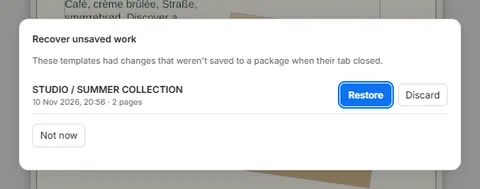
- Restore opens that template as it was, unsaved changes and all.
- Discard throws that draft away.
- Not now closes the dialog and keeps the drafts for next time.
Working offline
Section titled “Working offline”When the editor can’t reach the server, the header says Offline:

Editing, undo, and saving and opening packages keep working, and so does reloading the editor. What needs the server waits, greyed out with the reason: Preview, Export PDF, Publish, Check agreement, Open from server… and uploading fonts. The editor keeps checking: when the server is back, the header says Server connected and they work again.
If the server says Server was updated – reload, reload the page; your work is kept. When a new version of the editor is ready, a bar offers to Reload, and your work is kept then too.
Good to know
Section titled “Good to know”- Drafts stay in the browser you made them in: another browser or computer doesn’t see them, and clearing the browser’s site data deletes them.
- The editor keeps the drafts of up to five closed tabs, for 30 days.
- A draft open in another tab isn’t offered: it is still in use.
- Offline, a font from the library that this browser hasn’t used before shows as (not available offline) and can’t be used until the server is back.