

Styles
A style is a named look for text. A paragraph style sets a whole paragraph, its font, size, colour, alignment and spacing; a character style sets some words within one, a bold name, say. Change a style and all the text with it changes.
Make a style
Section titled “Make a style”- Format some text the way you want it.
- Select it, and in the text section choose New style from selection… in Paragraph style or Character style.
- Give it a Name and click Create.
The style is applied to the selection straight away. A paragraph style takes the look of the first selected paragraph; a character style only what differs from the paragraph around it, so a bold word gives a style that sets bold and nothing else.
Apply a style
Section titled “Apply a style”Select the text and choose the style in Paragraph style or Character style. A paragraph style keeps what only some words have, such as a bold word; a character style replaces those words’ own settings for what it sets.
Your own settings on top
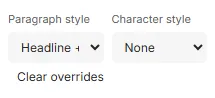
Section titled “Your own settings on top”Text can have settings of its own on top of its style. Then the menu shows the style’s name with a plus, such as Headline +, and Clear overrides appears: point at it to see which settings are the text’s own, click it to give the text its style’s look again.
Change a style
Section titled “Change a style”Format text with the style the new way, then choose Redefine “Body” from selection (with your style’s name) in the menu. Every paragraph with the style changes, at once and as one step to undo.
With nothing selected, the Styles section lists the template’s Paragraph styles and Character styles, each with what it sets and how often it is used:
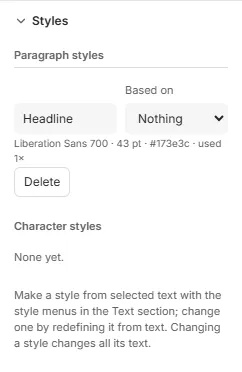
- Rename a style by editing its name.
- Based on builds a style on another: it then changes only what it sets itself, and follows the other for the rest. Change Body’s font, and Body bold, based on it, follows.
- Delete removes it. When text uses it, the editor asks what that text takes instead: no style, keeping its look, or another style.
Good to know
Section titled “Good to know”- Text takes its own settings first, then its character style’s, then its paragraph style’s.
- Copying frames to another template brings their styles along.
- Styles from your organisation’s brand kit are listed under Brand kit; they can’t be changed in the template. Detach makes one the template’s own.