

Rulers, guides and snapping
Rulers
Section titled “Rulers”The rulers along the top and left of the canvas measure in the template’s units, from 0 at the page’s top-left corner. They mark the bleed, where the selected frames are, and where the pointer is. To hide them, untick Show rulers in More actions (⋯) → Settings…
Guides
Section titled “Guides”Guides are lines that help you place frames. They are only in the editor: they never print or export.
- Add a guide by dragging it out of a ruler: from the top ruler for a horizontal guide, from the left one for a vertical guide. While you drag, its position shows by the pointer.
- Move it by dragging it.
- Place it exactly by double-clicking it, typing its position and pressing Enter.
- Remove it by dragging it back onto its ruler, or off the canvas. Or click it to select it and press Delete.
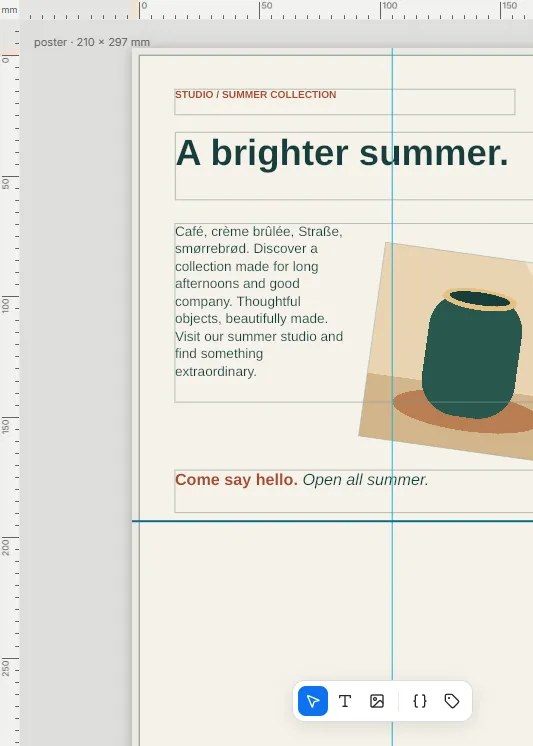
Each page has its own guides, and they are saved with the template.
In Settings… → Guides and snapping:
- Show guides shows or hides them.
- Lock guides keeps them where they are: clicks go through them to the frames beneath.
Snapping
Section titled “Snapping”While you move or resize a frame, or drag a guide, it snaps into line with what is nearby, and a line shows what it snapped to:
- the guides;
- the page’s edges, its centre and the edge of the bleed;
- the edges and centres of the other frames.
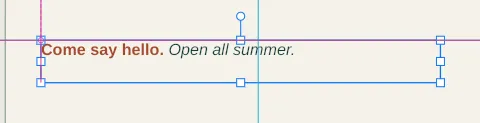
A frame snaps when it comes within a few pixels on screen, so zooming in lets you place it closer to something without snapping.
To place freely, hold Ctrl (Cmd on a Mac) while you drag, or untick Snap while dragging in Settings…
Good to know
Section titled “Good to know”- A guide lies on the page or its bleed. A position past the bleed is refused, with the range it must be in.
- A dragged guide goes in steps of 0.1 mm, or whole pixels in a pixel template, unless it snaps.
- While guides are hidden or locked, they can’t be moved or removed.
- When a frame snaps, it lands exactly on the line, even when that edge isn’t on a round number.
- An anchored frame snaps too, and keeps its anchor: its offset changes instead.
- Your choices for the rulers, guides and snapping are remembered by your browser, not saved with the template.