

Fills and strokes
Any frame can have a fill, a colour behind its text or image, and a stroke, a line around its edge. Both are in the frame’s Appearance section. For the colour of text itself, see Text.
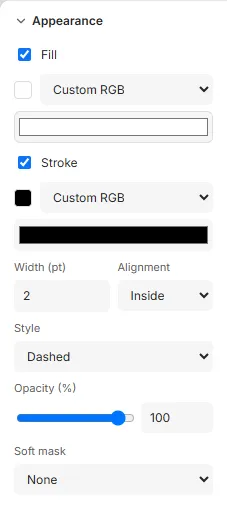
Fill a frame
Section titled “Fill a frame”Tick Fill, then choose its colour (see Choosing a colour below). The fill covers the frame’s shape: its rectangle, or its ellipse or custom shape.
Outline a frame
Section titled “Outline a frame”Tick Stroke: the frame gets a 1 pt black line inside its edge. Then set:
- its colour;
- Width (pt);
- Alignment: Inside the frame’s edge, on it (Centre), or Outside it;
- Style: Solid, Dashed or Dotted.

A stroke never changes the frame’s size or how its text flows: an outside stroke reaches beyond the frame.
Choosing a colour
Section titled “Choosing a colour”Every colour in Paprika, a fill, a stroke, a text colour or a page colour, is chosen the same way, from the menu next to its colour chip:
- Custom RGB: a colour of your own, from the colour picker.
- Custom CMYK: cyan, magenta, yellow and black, each 0 to 100 %, for print.
- One of the template’s swatches, listed under Swatches, or your organisation’s under Brand kit, with a Tint (%) to use a lighter shade of it. A gradient swatch takes no tint.
Using a swatch keeps the colour linked: when the swatch changes, everything using it changes too. See Colour.
CMYK and spot colours show on screen as the printing condition prints them. Until the colour engine has loaded, they show approximately, and the picker says Approximate on screen.
Make a frame see-through
Section titled “Make a frame see-through”Opacity (%) fades the whole frame, its fill, stroke and content together, from 100 (solid) to 0 (invisible). Type it, or drag the slider: a drag is one step to undo. To fade a frame across itself instead, see Soft masks.
Several frames
Section titled “Several frames”With several frames selected, a setting they don’t share shows Mixed. Ticking Fill or Stroke, or choosing a colour, gives it to all of them.
Good to know
Section titled “Good to know”- A stroke is at least 0.1 pt wide. Lines thinner than 0.25 pt may not print reliably, and Checks warns about them.
- Dashes and dots scale with the stroke’s width: dashes three widths long with gaps of two, dots a width across. The gaps stretch a little so the pattern fits the outline, with a dash or dot on every corner.